
If you are AIS registered, you can submit your employees' employment records to IRAS via Swingvy > Payroll > Year-end Tax. However, it is important to note that Appendix 8A/8B isn't currently supported on Swingvy so you'll need to exclude employees with BIK or Share Option Gains when you create the tax filing in Swingvy and submit their IR8A & Appendix 8A/8B directly on myTax Portal.
Below is a guide on the steps needed - this is split up into two parts:
Part 1: Generate the IR8A data
Step 1 - Navigate to Payroll > Year-end tax and click "Create tax file" button
Step 2 - Select only the employees who require Appendix 8A (BIK) or Appendix 8B (Share Option Gains)
Step 3 - Review the IR8A form details and apply any necessary changes to correct income data.
Step 4 - Click "Download xlsx" button located in the header
Note: This batch is for Excel file generation only. Do not attempt to submit these employees to IRAS via Swingvy; Submissions requiring BIK or Stock Option reporting will fail validation.
Part 2: Input Appendix data in Excel and upload it to myTax Portal
Step 1 - Enter the relevant data for your employees in Appendix sheets and save the change.
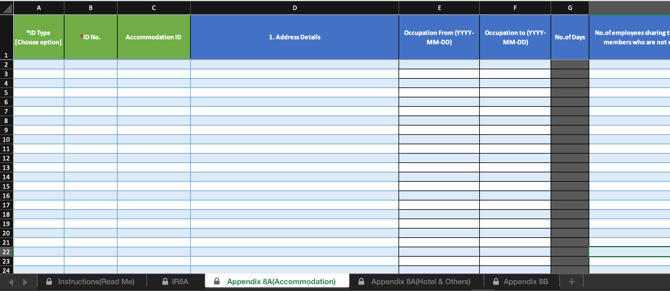
- For Benefits-in-Kind: Go to the tabs labeled Appendix 8A (Accommodation) and Appendix 8A (Hotel & Others).
- For Share Option Gains: Go to the Appendix 8B tab.
Step 2 - Login to the myTax Portal and upload Excel file following the IRAS user guide.